
preload preload preload preload

Cannot modify header information问题的解决方法


2008年 4月 29日 1,968 views3 Comments

昨晚升级WordPress 2.5.1 ,记事本编辑了wp-config-sample.php为wp-config.php,结果登录管理页面/wp-admin/时遭遇如下问题:

Warning: Cannot modify header information – headers already sent by ……

搜索“Cannot modify header information”得到一票解决方法,简单说就是拿记事本编辑的php文件不是UTF-8(无BOM)编码的,更改php文件还是用Notepad++(这是一款主页上抵制北京奥*运的软件,囧)或UltraEdit靠谱。
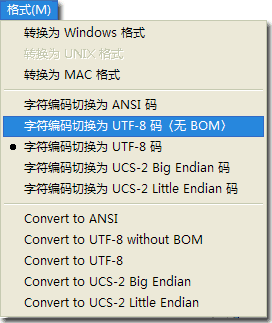
切换编码

切换编码后保存,再上传就可以解决问题。

标签: blog, php, WordPress

相关日志:

  • 3 responses to "Cannot modify header information问题的解决方法"

  • 大猫
    8:44 on 七月 23rd, 2008

    这个引起的问题都很诡异..

    [回复]

  • 枯の灵
    13:13 on 十月 6th, 2008

    我恨死记事本了

    嘟嘟

    [回复]

  • hushui
    21:26 on 十月 23rd, 2008

    cool 帮俺解决了问题

    [回复]

  • Trackbacks

  • Trackback from都是utf8惹得祸,成功解决主题变形问题 | 软件生活
    星期五, 2 五月, 2008

    [...] 我昨天说过:“我尝试过很多方法解决,并基本上判定是某个地方的编码不对导致的,到最后还是搞不定”。后来晚上和抽筋儿讨论copyfeed插件时无意之中进到了他的个人blog。并在他的这篇文章启发下,我终于完美解决了这个问题! [...]

  • Leave a Reply

    * Required
    ** Your Email is never shared